| TRNW Network |
Shop Locator Help |
January 26, 2008 |
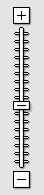
- When you first load the map, it is zoomed out so that you can see all of the shops in one screen. To zoom in, you can use the zoom meter on the top-left corner of the map. The zoom meter looks like the picture to the right.
Click on the plus sign to zoom in, or click on the minus sign to zoom out. You can also click anywhere on the meter to zoom in to that level.
- Please note that before zooming in, it is better to center the map to the location that you want to zoom in on. You can center the map to a location, and zoom in one level by double-clicking a location that does NOT have a marked location symbol like the one below.

- Clicking on a marked location symbol like the one above, will bring up the information for that location. There is also a link to click on for more infomation on the shops that are listed on Google Maps.

- To navigate around on the map, there is an navigation bar just like the picture on the right. Click on an arrow to navigate in that direction, or click on the center of the navigation bar to reload the map to it's default state.
- Please take note that there are actually two locations in Anchorage Alaska, but only one is visible until you zoom in.
|